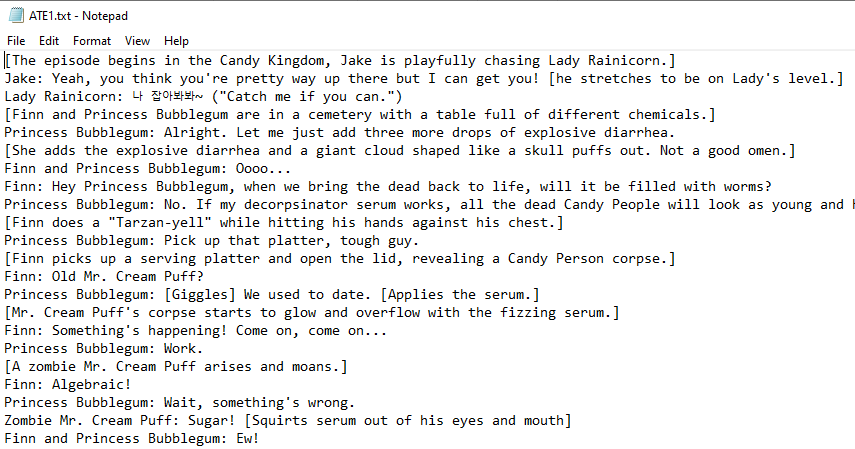
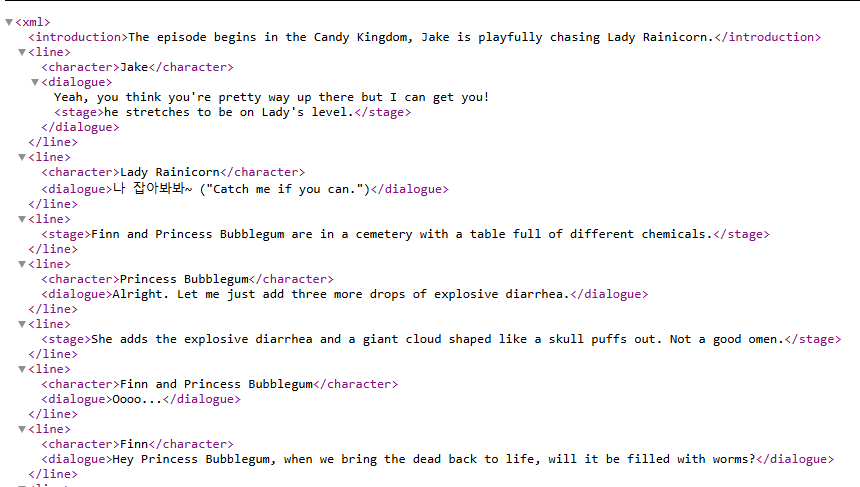
This is documentation on how we used REGEX to transform raw text files
into workable XML. REGEX, also known as regular expressions, is a sequence of
characters that defines a search pattern. Using this, we can refill the
highlighted information with xml tags like <character></character>
REGEX Steps
First, like usual I found an eliminated all >, <, and & that would
ruin our xml. Fortunately, there was nothing to be removed and I could
immediately start on the process.
FIND
(^.+)
REPLACE
<line>\1</line>
This wraps every sentence with a line tag. then I found that every character
was followed by a colon.
FIND
<line>(.+):
REPLACE
<line><character>\1</character>
This keeps the line tag intact when I find/replace. Next, dialogue
FIND
</character>(.+)</line>
REPLACE
</character><dialogue>\1</dialogue></line>
Now all I have left is stage directions and clean up. I saw that the stage
directions were wrapped in square brackets.
FIND
\[(.+?)\]
REPLACE
<stage>\1</stage>
Now I wrapped the whole thing in xml and fixed the beginning and end with an
intro and credits tag.